
Installation
Install from the Visual Studio Marketplace
Install Salesforce B2C Commerce from the Visual Studio Marketplace, search for Salesforce B2C Commerce in the VS Code Extensions view, or run:
code --install-extension Salesforce.b2c-vs-extensionReload the window when prompted. The extension's developer, operations, API, and sandbox views appear in the activity bar.
Install from a VSIX
GitHub Releases also provides a pre-built .vsix for offline installation and compatible editors that cannot install directly from the Visual Studio Marketplace.
Get the latest build
Latest version: 1.0.2 (released Jul 16, 2026).
Install it
Once you've got the file, install it from the command line or from the Extensions view in VS Code.
code --install-extension b2c-vs-extension-X.Y.Z.vsixcursor --install-extension b2c-vs-extension-X.Y.Z.vsix1. Open the Extensions view (Cmd+Shift+X / Ctrl+Shift+X)
2. Click the "..." menu in the view header
3. Choose "Install from VSIX..."
4. Pick the file you just downloaded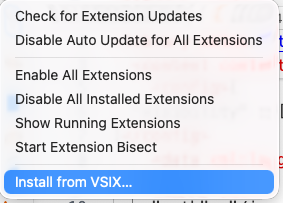
Before you start
A few things to have ready:
- VS Code 1.105 or newer (Cursor and VSCodium work too when installed from the
.vsix). - Access to a B2C Commerce instance for remote workflows.
- The B2C CLI is optional. Install it when you want to run the same operations from the terminal or CI. See the CLI Installation guide for installation options.
Connect to your sandbox
The extension uses the same connection your CLI already uses, so most of the time there's nothing more to set up. Different features need different credentials though — see Connecting to your sandbox for what each one needs and a copy-paste example.
New here? The Authentication Setup guide walks through getting your credentials in the first place.
Next Steps
- Overview — what the extension can do.
- Connecting to your sandbox — what each feature needs.